Tickets
Kennisbank
Terug naar de website
Inloggen
Home
Inloggen
Registreer
Terug naar de website
Er was een probleem met het laden van de reacties.
Een database verwijderen in Plesk
Support Portal
»
Kennisbank
» Bekijkt artikel
Printen
20-05-2025 19:35
Email
Plesk
Log in op je Plesk-account.
Klik op
Databases
in het zijmenu.
Kies de database die je wilt verwijderen uit de
lijst met databases
.
Ga verder met
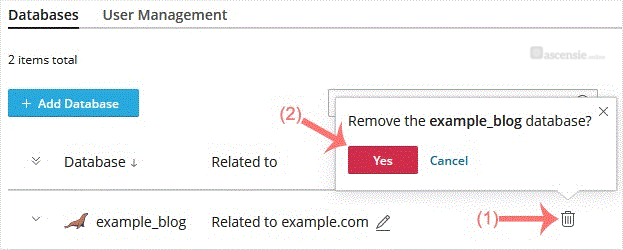
Remove Database
. Er verschijnt een bevestigingsvenster. Bevestig met
Yes
.
Je database wordt verwijderd.
Deel via
Is dit artikel zinvol?
Gerelateerde artikelen
Een databasegebruiker verwijderen in Plesk
Een FTP-account verwijderen in Plesk
Reacties
Voeg Reactie toe
Beantwoorden aan
Annuleer
Categorieën
1
Diensten
6
E-mail
4
Funnel Synergy
3
Google
2
Klantaccount
99
Plesk
3
— CloudLinux (Plesk)
2
— Databases
2
— Domain Management
81
— Email
4
— FTP
2
— General (Plesk)
2
— Security
12
WordPress
1
— Elementor
1
— Formulieren
2
— Orderable
© Zentic
Dutch
English
Spanish