Er was een probleem met het laden van de reacties.

How to Redirect Your Website to Any Page or External Domain

Support Portal  »  Kennisbank  »  Bekijkt artikel

Printen

1. Log in to your cPanel account.


2. In the Domains section, click on Redirects.


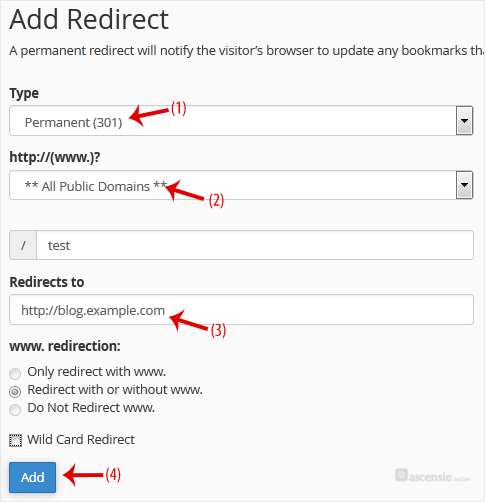
3. Under Add Redirect, you should enter the following details and choose the appropriate options.
Type: Choose Permanent (301) or Temporary (302).
https?://(www.)? Leave this as it is, or should you want to redirect a directory or a page, enter the name of your directory or a full page in the text box.
Redirects to: Points to where you want to redirect your current domain or a page.


4. Click on Add.


Deel via
Is dit artikel zinvol?

Reacties

Voeg Reactie toe

Beantwoorden aan  


Self-Hosted Help Desk Software by SupportPal
© Zentic