Er was een probleem met het laden van de reacties.

How to Protect Website Images From Being Displayed at an External Website

Support Portal  »  Kennisbank  »  Bekijkt artikel

Printen

External websites may display your website images on their websites, thus stealing your bandwidth. You can prevent this with Hotlink Protection.


1. Log in to your cPanel account.


2. In the Security section, click on HotLink Protection.


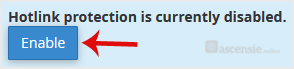
3. If it displays Hotlink protection is currently disabled, click on Enable.


How to Configure Hotlink Protection?

Under URLs to allow access, you can allow access to an external website or your website. For example, if you have a subdomain such as demo.example.com, you can add this website's URL to the list of allowed websites.


Deel via
Is dit artikel zinvol?

Reacties

Voeg Reactie toe

Beantwoorden aan  


Self-Hosted Help Desk Software by SupportPal
© Zentic