Er was een probleem met het laden van de reacties.

How to Increase PHP's upload_max_filesize Value Using CloudLinux Selector in Plesk

Support Portal  »  Kennisbank  »  Bekijkt artikel

Printen


You can modify PHP's upload_max_filesize as per your needs using CloudLinux's PHP Selector in Plesk.


1. Log in to your Plesk account.


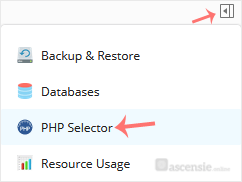
2. Click on the Pull icon in the right sidebar and choose PHP Selector.

plesk-cl-php-selector-menu.gif


3. Click on the Options menu.

cl-options-menu.gif

Note: If the Options page shows an error related to the native PHP version, change it to a non-native version first.


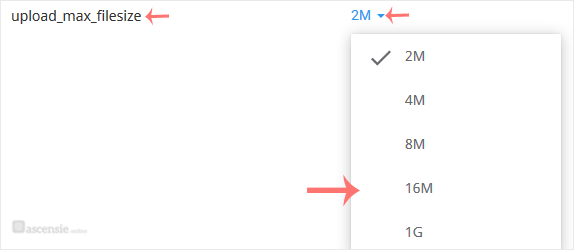
4. Look for upload_max_filesize and click on the drop-down option displayed in front of it. Then choose the appropriate limit as per your requirements.

cl-upload-max_filesize.gif


Deel via
Is dit artikel zinvol?

Reacties

Voeg Reactie toe

Beantwoorden aan  


Self-Hosted Help Desk Software by SupportPal
© Zentic