Je kunt de CloudLinux Selector gebruiken om de GD-extensie in PHP in te schakelen via Plesk.
- Log in op je Plesk-account.
- Klik op het Pull-icoon in de rechterzijbalk en kies PHP Selector.
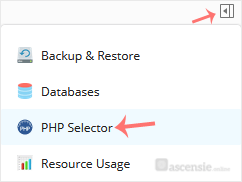
- Klik op het menu Extensions.

Let op: als de pagina Extensions een foutmelding toont die te maken heeft met de native PHP-versie, wijzig deze dan eerst naar een niet-native versie. - Vink GD aan. Zodra het is ingeschakeld, verschijnt er een succesmelding.

De melding geeft aan dat de module GD is opgeslagen.

