Je kunt bestanden van je website naar je computer downloaden met de FileZilla Client.
- Open de FileZilla FTP Client.
- Vul je FTP-host, gebruikersnaam en wachtwoord in. Je kunt je cPanel-gebruikersnaam en -wachtwoord gebruiken als FTP-gebruiker en -wachtwoord. Klik daarna op Quick Connect.
- Vul je domeinnaam in het veld Host in, bijvoorbeeld
ftp.example.com of example.com.

- Selecteer aan de rechterkant, in het vak Filename, de bestanden of mappen die je wilt downloaden. Houd de CTRL-toets ingedrukt om meerdere mappen/bestanden te kiezen. Klik vervolgens met de rechtermuisknop op de selectie en kies Download.
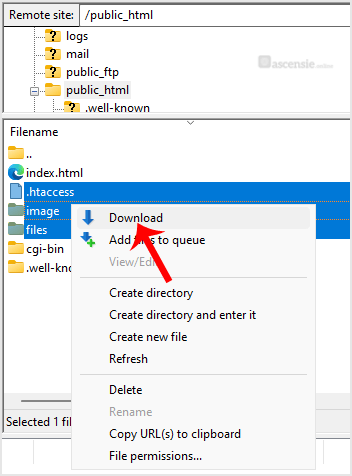
Het downloaden kan een paar minuten duren. Je kunt de voortgang volgen.

