Een back-up maken is belangrijk — doe dit regelmatig. Volg deze handleiding om losse onderdelen van je website te back-uppen en te downloaden via cPanel.
- Log in op je cPanel-account.
- Klik in het onderdeel Files op Backup Wizard.
- Klik onder Backup or Restore op Back Up.
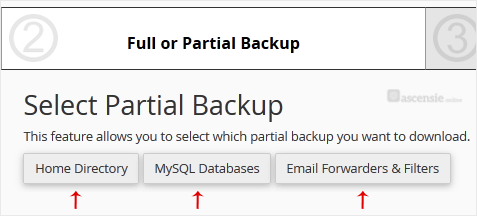
- Kies onder Select Partial Backup een van de beschikbare opties. Klik bijvoorbeeld op Home Directory voor een back-up van je thuismap.
- Klik vervolgens op Download.

