Er was een probleem met het laden van de reacties.

How to Deactivate and Delete a WordPress Plugin

Support Portal  »  Kennisbank  »  Bekijkt artikel

Printen

You can deactivate and delete unused plugins from the WordPress dashboard.


1. Log in to the WordPress dashboard.


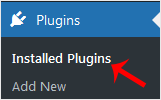
2. From the Dashboard menu, go to Plugins and click on Installed Plugins.
wp-plugin-installed-plugin-menu.gif


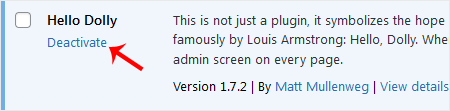
3. If you want to deactivate the Hello Dolly plugin, click on Deactivate, which appears below the plugin's name.
wp-plugin-deactivate-hellodolly.gif


How to Delete a Plugin in WordPress?

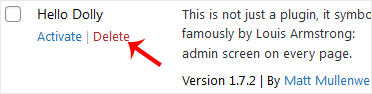
Once the plugin is deactivated, the delete option will appear.

Click on Delete, displayed at the bottom of the deactivated plugin's name. Confirm with OK to remove it.
wp-plugin-delete-hellodolly.gif


Deel via
Is dit artikel zinvol?

Reacties

Voeg Reactie toe

Beantwoorden aan  


Self-Hosted Help Desk Software by SupportPal
© Zentic