Er was een probleem met het laden van de reacties.

How to Change the PHP Version via CloudLinux Selector in Plesk

Support Portal  »  Kennisbank  »  Bekijkt artikel

Printen


You can use CloudLinux's Select PHP Version to change your website's PHP Version. CloudLinux provides various PHP Versions to choose from.


1. Log in to your Plesk account.


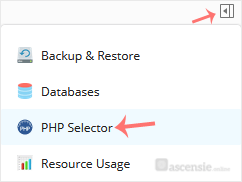
2. Click on the Pull icon in the right sidebar and choose PHP Selector.

plesk-cl-php-selector-menu.gif


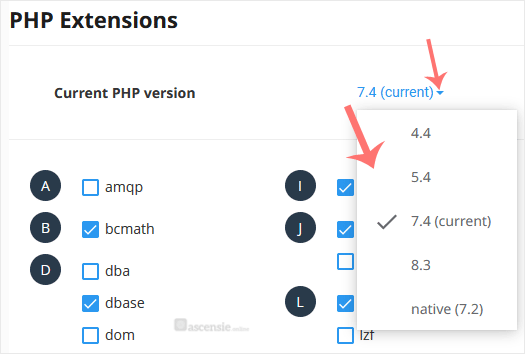
3. To the right side of the Current PHP version, click on the drop-down menu and choose the version you want to use.

plesk-da-cl-change-php-version.gif


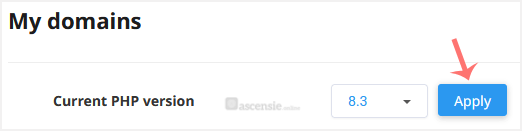
4. Click Apply.

cl-set-as-php-version.gif


Deel via
Is dit artikel zinvol?

Gerelateerde artikelen


Reacties

Voeg Reactie toe

Beantwoorden aan  


Self-Hosted Help Desk Software by SupportPal
© Zentic