Een gebruiker aan een database toevoegen en rechten toekennen
Printen
- Log in op je cPanel-account.
- Klik in het gedeelte Databases op MySQL Databases.

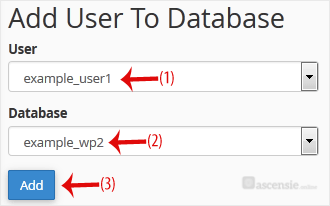
- Scroll naar het einde van de pagina naar Add User to Database. Selecteer een gebruiker uit de keuzelijst en kies een database uit de lijst.
- Klik op Add.
- Vink bij Manage User Privileges het vakje ALL PRIVILEGES aan en klik op Make Changes.

Reacties
© Zentic

