Er was een probleem met het laden van de reacties.

How to Add a Subdomain in Plesk

Support Portal  »  Kennisbank  »  Bekijkt artikel

Printen


1. Log in to your Plesk account.

2. Click on Websites & Domains from the Sidebar Menu.

plesk-websites-and-domains-menu.gif


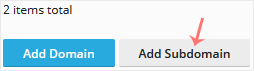
3. Click on Add Subdomain.

plesk-add-subdomain-button.gif


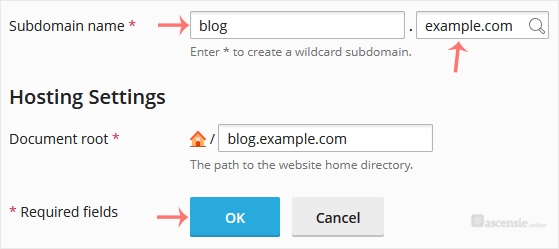
4. Enter a subdomain name and select a domain from the Domain field.

plesk-add-subdomain-options.gif

5. Click OK.


Once your Subdomain is added, you can manage it from Websites & Domains.


Deel via
Is dit artikel zinvol?

Reacties

Voeg Reactie toe

Beantwoorden aan  


Self-Hosted Help Desk Software by SupportPal
© Zentic