WordPress-categorieën zijn handig om je berichten te ordenen. Je kunt categorieën en subcategorieën aanmaken, en berichten kunnen aan meerdere categorieën worden toegewezen.
- Log in op het WordPress-dashboard.
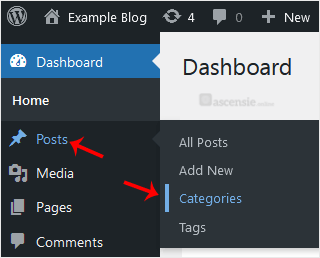
- Ga in het dashboardmenu naar Berichten en klik op Categorieën.
- Voer de volgende gegevens in onder Nieuwe categorie toevoegen:
- Naam: Voer een categorienaam in, bijvoorbeeld Computer.
- Slug: Voer een slug in of laat dit leeg.
- Hoofdcategorie: Laat dit op Geen staan, of selecteer een categorie om hiervan een subcategorie te maken.
- Beschrijving: Voer een categoriebeschrijving in of laat dit leeg.
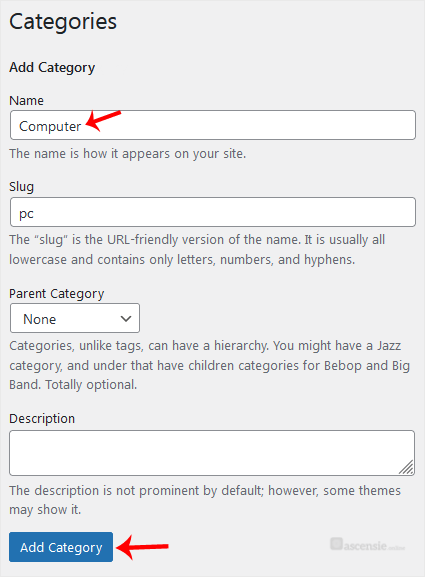
- Klik op Nieuwe categorie toevoegen.
Je nieuwe categorie is aangemaakt.

